

Odoo 19 E-Invoicing Integration with NIC Portal: A Complete Guide
In today's digital business environment, GST compliance and efficient invoice management are essential for every business in India. Managing invoices manually can be time-consuming and may lead to errors in tax calculations, invoice reporting, and compliance processes.
Odoo 19 ERP offers a powerful accounting solution that helps businesses automate their invoicing operations through Indian GST localization. One of its key features is e-Invoicing integration with the NIC (National Informatics Centre) portal.
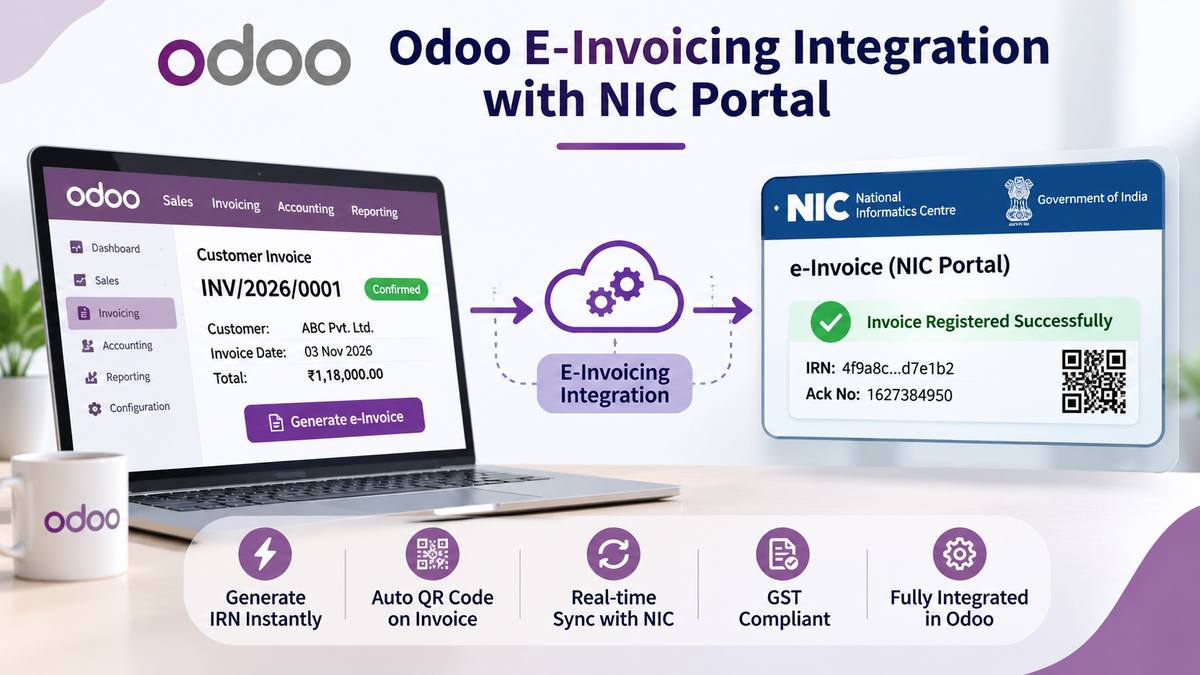
With Odoo 19 e-Invoicing integration, businesses can generate invoices in Odoo and submit eligible invoice details to the NIC e-Invoice portal to obtain the Invoice Reference Number (IRN) and digitally signed QR code.
Let's explore how Odoo 19 connects with the NIC portal, how the configuration works, and the benefits of this integration for Indian businesses.
What Is GST e-Invoicing?
GST e-Invoicing is a system introduced by the Government of India to electronically authenticate specified GST invoices through the Invoice Registration Portal (IRP).
Businesses create invoices in their ERP or accounting software, and the invoice details are reported to the IRP for validation and registration. After successful validation, the portal generates:
- Invoice Reference Number (IRN)
- Acknowledgement Number
- Acknowledgement Date
- Digitally Signed QR Code
The registered invoice data is also shared with the GST system for applicable reporting purposes.
What Is Odoo 19 NIC Portal Integration?
This integration connects the Odoo Accounting module with the Indian GST e-Invoice system. Odoo’s Indian Accounting localization supports GST-related operations, including e-Invoicing.
Through the configured GST Suvidha Provider (GSP), eligible invoices are submitted directly from Odoo to the NIC portal, so there is no need to enter each invoice manually on the government portal.
How Does Odoo 19 E-Invoicing Work?
1. Create a customer invoice. In the Accounting module, create an invoice with the supplier and customer GSTIN, invoice number and date, product or service details, HSN/SAC codes, taxable value, GST amounts, and total value.
2. Confirm the invoice. Once you confirm it after review, Odoo prepares the data required for e-Invoice registration.
3. Submit to the NIC portal. Start the e-Invoicing process from Odoo. Odoo uploads the invoice data to the NIC portal through the configured GSP.
4. IRN is generated. The IRP validates the invoice. On successful registration, it returns the IRN, acknowledgement details, and the signed QR code.
5. Odoo is updated. These details are stored with the invoice, and the invoice PDF can show the IRN, acknowledgement number, acknowledgement date, and QR code.
How to Configure Odoo 19 E-Invoicing with the NIC Portal
Step 1: Install the Indian Localization
Install the following modules:
- Indian Accounting (
l10n_in) - Indian E-Invoicing (
l10n_in_edi)
Step 2: Set Up Company GST Details
Go to Settings → Companies → Update Info and fill in the Company Name, Address, State and PIN Code, PAN, and GSTIN. Make sure the GSTIN is accurate.
Step 3: Create an API User on the NIC Portal
Log in to the NIC e-Invoice portal (https://einvoice1.gst.gov.in/) and go to API Registration → User Credentials → Create API User. Complete the OTP verification, select Through GSP as the API interface, choose the GSP provider, and create the API username and password.
Step 4: Configure the GSP and Credentials in Odoo
Go to Accounting → Configuration → Settings and open the Indian Integration section. For the standard Odoo 19 documented integration, the GSP provider is BVM IT Consulting Services India Private Limited. Enable E-Invoicing and enter the API username and password created on the NIC portal.
Step 5: Test First, Then Enable Production
Before going live, test your invoices in the test environment. Once the credentials and configuration are verified, enable the Production Environment option.
Step 6: Generate an E-Invoice
Open a confirmed customer invoice, click Send, select the E-Invoicing option, and click Generate. After successful registration, the IRN and acknowledgement details are updated on the invoice.
Benefits of Odoo 19 NIC Portal Integration
- Automated registration: Eligible invoices are submitted directly from Odoo.
- Improved GST compliance: The process supports businesses covered under applicable e-Invoice requirements.
- Fewer errors: Less manual data entry means fewer mistakes.
- Faster processing: Repetitive administrative work is reduced.
- Centralized accounting: Invoices, accounting entries, and e-Invoice details live in one place.
- Better tracking: Registration status and details are visible on the invoice record itself.
Common Challenges and How to Avoid Them
- Incorrect GSTIN: A wrong supplier or customer GSTIN causes validation failures. Verify customer master data in advance.
- HSN/SAC errors: Incorrect classification codes can lead to invoice rejection.
- API authentication issues: Wrong credentials or GSP settings can break the connection between Odoo and the NIC portal.
- Tax calculation errors: Incorrect GST rates, place of supply, or tax values trigger validation errors.
- Connectivity issues: Portal downtime or network problems can interrupt registration. Retry after some time.
Proper configuration and testing help catch most of these problems early.
Frequently Asked Questions
Is the IRN generated automatically in Odoo 19?
After confirming the invoice, you generate the IRN using Send → E-Invoicing → Generate. Once registration succeeds, the details are updated on the invoice automatically.
Is e-Invoicing mandatory for all businesses?
No. It applies only to businesses above the turnover threshold notified by the government. Please check the latest limit on the GST portal.
Can I test before going live?
Yes. Odoo supports a test environment, and you should enable the Production Environment only after testing is complete.
Conclusion
Odoo 19’s NIC portal integration makes GST invoicing simpler for Indian businesses. Eligible invoices are submitted electronically, the IRN and QR code are received automatically, and everything is managed inside Odoo.
If you want to implement Odoo 19 with GST e-Invoicing, Neemkaroli Consulting can help you configure and customize Odoo ERP to fit your business requirements. Contact us to learn more about Odoo implementation, customization, and GST e-Invoicing solutions.Invoicing Integration Work?